In 2026, the question is no longer whether AI can write code — it is whether AI can write code inside your workflow, with your files, your conventions, your test suite and your cloud project in view. Gemini Code Assist has quietly become one of the strongest answers to that question. This deep-dive walks through what it actually does, how its pipeline works, where it fits next to the rest of the market, and how to prompt it like a senior engineer rather than a tourist.
If you are still building your mental model of the field, start with this complete guide to artificial intelligence before diving into tooling. Once you understand the difference between a model, an agent and an assistant, the design decisions inside Gemini Code Assist start to make a lot more sense. And if you are simply shopping for a stack, the roundup of the best AI tools for developers in 2026 gives you the wider landscape before we zoom into this particular product.
Gemini
Code Assist
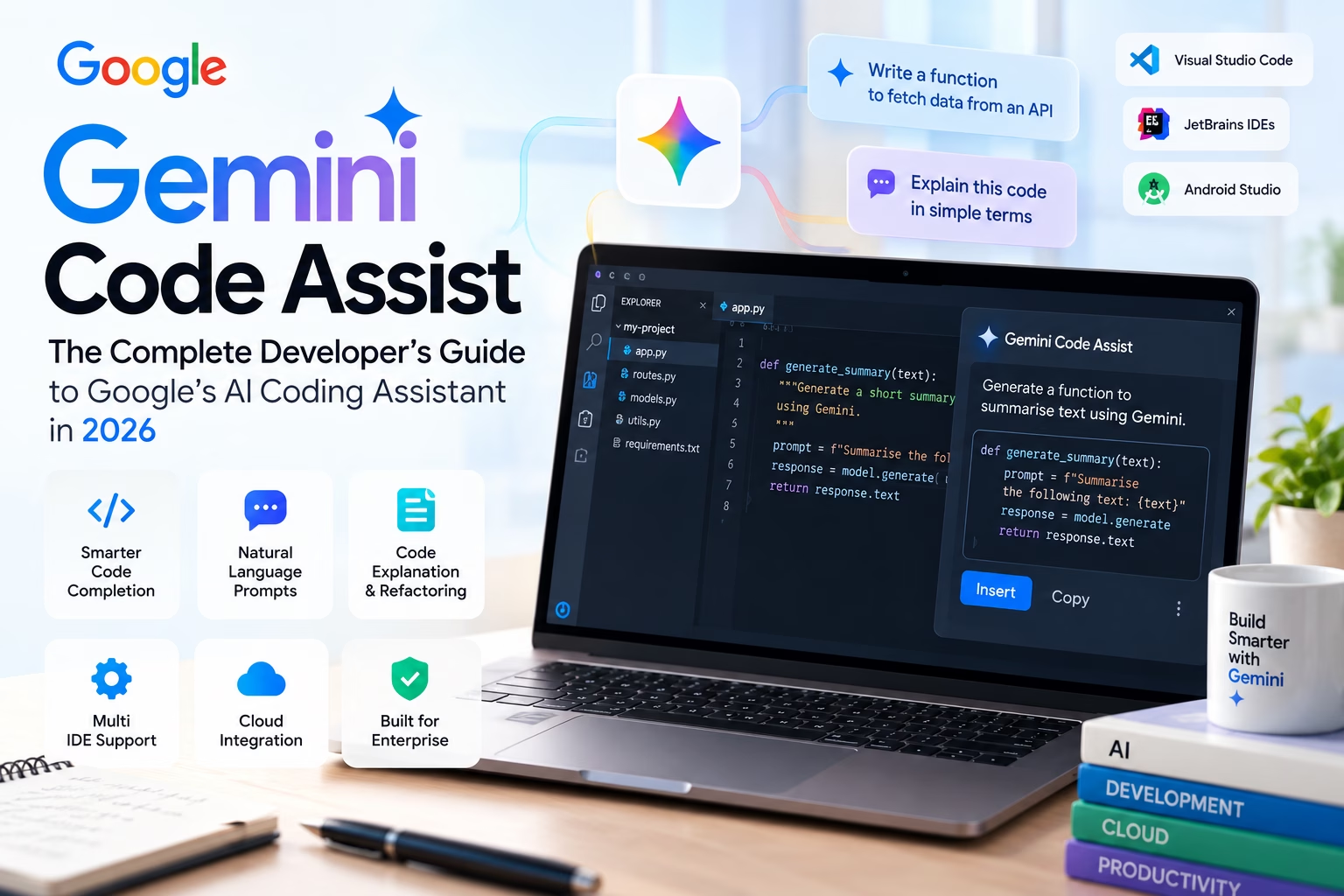
An agentic coding companion that reads your repository, drafts real code, explains legacy modules and ships review-ready diffs — without leaving the IDE.
app.py, routes.py, models.py), an inline AI chat panel,
floating prompt cards and the six capabilities that define the product in 2026.
What Is Gemini Code Assist, Exactly?
Gemini Code Assist is Google’s AI coding companion: a layer that sits on top of the Gemini family of models and plugs into the tools developers already use. It is not a separate app you have to learn. It is a panel in VS Code, a plugin in JetBrains IDEs, a companion in Android Studio, and a service inside Google Cloud’s console. The core promise is simple — you keep typing, and the assistant fills in the rest with awareness of your repository rather than just the file in front of you.
The 2026 generation differs from the autocomplete tools of 2023–24 in one important way: it is agentic. Older assistants predicted the next token. Modern Code Assist plans multi-step changes, reads relevant files, proposes diffs across several of them, runs a test command, inspects the failure, and tries again. That shift from “predict” to “act” is the same shift that separates classical models from agents, and if the terminology feels fuzzy, the explainer on what machine learning actually is is a good primer on the underlying machinery — training data, loss functions, and why a model can be confidently wrong.
Where it sits in the model stack
Under the hood, Code Assist routes your request through a specialised coding model that has been tuned for repository-scale context. Google positions this model against the current frontier — the kind of capability jump discussed in the analysis of GPT-6 Astra. The practical takeaway for a working developer is not which benchmark number is higher this week. It is that all the major labs have crossed the threshold where generated code is frequently review-ready rather than merely plausible.
What differentiates Code Assist is the context window and the grounding. A million-token context means you can hand it an entire service — routes, models, migrations, tests, config — and ask a question about how a change in one file will ripple through the others. Grounding in your Cloud project means it can reason about your actual deployment target, not a hypothetical one.
The AI Coding Workflow, Visualised
Before we look at features, it helps to see the loop. Almost every productive AI-assisted coding session follows the same six-stage path, whether the developer is aware of it or not. Understanding the loop is what turns AI assistance from a novelty into a repeatable engineering practice.
main unsupervised.
Two things about this loop are worth internalising. First, the quality of stage two (the prompt) dominates the quality of everything downstream. A vague prompt produces vague code, and vague code takes longer to review than code you would have written yourself. Second, stage five is where the real engineering happens. The assistant’s job is to compress the distance between an idea and a reviewable diff — not to remove the reviewer.
Why the loop is faster than it looks
On paper, six stages sound slower than just writing the function. In practice, stages three and four collapse into a few seconds, and the context retrieval that used to take a developer ten minutes of tab-hopping happens automatically. The net saving is usually 20–40% on boilerplate-heavy work — CRUD endpoints, serialisers, migration scaffolding, test fixtures — and considerably less on novel algorithmic work, where the human still owns the thinking.
The Capabilities That Actually Matter
1. Repository-aware completion
Standard autocomplete sees the current file. Code Assist sees the current file, the files it imports, the tests that cover it, and the naming conventions used across the repo. That is why its suggestions tend to use your helper functions instead of inventing new ones. The practical effect is subtle but cumulative: fewer “almost right” completions that you have to correct.
2. Natural-language code generation
You describe the behaviour; it proposes an implementation. The trick to making this useful is to
specify the contract — inputs, outputs, error cases — rather than the vibe. “Write a function that
validates an email” produces generic code. “Write a function that validates an email, returns
None on success and an error string on failure, and matches the signature of
validate_phone in validators.py” produces code you can actually ship.
3. Explanation and onboarding
The highest-value, lowest-hype feature. Point the assistant at an unfamiliar module and ask it to explain the data flow, the invariants, and the parts that look like workarounds. For teams inheriting a legacy codebase, this compresses onboarding from weeks to days. It is also a genuinely good way to check your own understanding before a design review.
4. Agent mode and multi-file edits
Agent mode is the headline capability of this generation. You give it a task — “add rate limiting to the public API and update the tests” — and it plans the change, touches the relevant files, proposes a combined diff, and iterates on failures. Crucially, you approve each step. The approval gate is not a nuisance; it is the feature. An agent that can edit twelve files without supervision is an agent that can break twelve files without supervision.
5. Cloud grounding
For teams already on Google Cloud, the assistant can reason about your actual environment: the services you use, the IAM model, the deployment configuration. That turns “how do I connect to a database” into “how do I connect to our Cloud SQL instance from this service”, which is a materially different and more useful question.
6. Enterprise controls
VPC Service Controls, IAM-based access, audit logging, and a contractual commitment that your code is not used to train shared models. This is the set of features that decides whether a tool can be used at all in a regulated organisation, and it is where the “enterprise capabilities” card in the hero illustration earns its place.
Inside the IDE: A Full Integration Walkthrough
Abstract feature lists are easy. What matters is the actual surface. Below is a faithful representation of the integration layout: project explorer on the left, editor in the centre, Gemini assistant panel on the right, with a developer prompt and a suggested diff visible in the same view.
retry
decorator around the gateway call and extend test_checkout.py.
Proposed diff:
Notice what the panel does not do: it does not silently rewrite the file. The diff is presented, the developer accepts or rejects, and the version control history stays honest. That single design decision is why teams with strict review cultures can adopt this class of tool without rewriting their engineering standards.
Working across IDEs without losing context
A developer might write backend Python in VS Code, Kotlin in Android Studio, and debug a Java service in IntelliJ. Code Assist keeps a consistent surface across all three, which matters more than it sounds: inconsistent tooling fragments habits. When the same shortcut opens the same panel with the same behaviours, the assistant becomes muscle memory instead of a feature you remember to use.
Four Prompts That Do Most of the Work
After a year of watching teams adopt these tools, the same four prompt patterns account for the overwhelming majority of real value: debugging, code generation, unit testing, and refactoring. Each has its own grammar. Get the grammar right and the assistant feels like a senior pair; get it wrong and it feels like a confident intern.
Debugging prompts
The mistake most developers make is asking for a fix. A fix short-circuits the reasoning and gives you a patch you do not understand. Ask instead for ranked hypotheses and the evidence that would confirm or refute each one. This mirrors how a strong engineer debugs: narrow the search space first, then change code. It also tends to surface the real cause — usually a race condition, a timezone assumption, or an environment variable that only exists on one machine.
Generation prompts
Contract-first prompting is the single biggest quality lever. Name the function, its signature, its
return shape, its error modes, and the file it belongs in. Then mention the local convention —
“match the style of validators.py“. The assistant will follow the pattern it finds,
which means less cleanup for you and fewer subtly different abstractions accumulating in the
codebase.
Testing prompts
Ask for failure modes explicitly and you get tests that actually fail when the code breaks. Ask for “some tests” and you get happy-path assertions that pass forever. Specify the framework, the fixtures available, and whether you want mocking. If you are comparing assistant quality across vendors, run the same testing prompt through each — the differences in edge-case coverage are one of the clearest signals you can measure.
Refactoring prompts
Always state the invariant. “Extract the validation logic into its own module, but the public API and all existing tests must remain unchanged” gives the assistant a hard boundary. Without it, you get a refactor that quietly renames things and breaks three call sites. With it, you get a diff you can review in ninety seconds.
The 2026 AI Coding Ecosystem
No serious team uses one assistant. They use one as the default and reach for others when the default hits a wall — a different context window, a different agent loop, a different price point. The ecosystem below is the current landscape, with Gemini Code Assist at the centre of this article’s frame of reference.
How the others differ, briefly
GitHub Copilot remains the default for teams already living inside GitHub. Its strength is depth of editor integration and the sheer polish of inline suggestions; its pull-request summaries and review comments are genuinely useful in day-to-day work. If your organisation runs on GitHub Actions and pull requests, Copilot is the lowest-friction starting point.
Cursor takes the opposite bet: rather than bolt AI onto an existing editor, it rebuilt the editor around AI. Multi-file editing and its codebase-wide context index are excellent, and the tab-completion model is arguably the best in class. The trade-off is that you migrate your entire editing environment to get the full benefit.
Claude Code is terminal-first and unapologetically agentic. It excels at long, multi-step tasks where you want the assistant to run commands, read output, and iterate. It feels less like a plugin and more like delegating a ticket to a very fast colleague who narrates everything they do.
OpenAI Codex leans into task delegation: hand it a well-scoped issue, walk away, come back to a branch. Best suited to teams with strong CI and good test coverage, because the feedback loop is what makes the delegation safe.
Windsurf is built around “flow” — minimising the number of times you break concentration to approve something. Its cascade model is designed to keep you in the editor rather than in a chat panel. It is the most opinionated of the group, and opinions are exactly what some developers want.
Where the wider industry is heading
The interesting signal is that these tools are converging on the same architecture: a large context window, a retrieval layer over your repository, a planning loop, a sandboxed execution environment and a human approval gate. The differentiation is moving away from raw model quality and toward workflow design — how much the tool interrupts you, how well it understands your conventions, and how safely it can act. The same pattern is visible well outside software, in domains as different as launch engineering, where AI in aerospace and launch operations is being used the same way: not to replace the engineer, but to compress the loop between observation and decision.
Side-by-Side: Choosing Your Default Assistant
| Tool | Best for | Agent capability | Watch out for |
|---|---|---|---|
| Gemini Code Assist | Large repos, Google Cloud shops, multi-IDE teams | Strong — multi-file plans with per-step approval | Best value when you are already on Google Cloud |
| GitHub Copilot | GitHub-centric teams wanting minimal disruption | Good — improving fast on multi-file tasks | Less aggressive on autonomous long tasks |
| Cursor | Developers willing to switch editors for max AI depth | Strong — codebase indexing is excellent | Migration cost; editor lock-in |
| Claude Code | Terminal workflows and long multi-step jobs | Excellent — genuinely agentic | Requires comfort with CLI-first flows |
| OpenAI Codex | Delegating well-scoped issues to a background agent | Excellent — task delegation model | Needs strong tests and CI to be safe |
| Windsurf | Flow-state coding with minimal interruptions | Good — cascade editing | Opinionated defaults may not suit every team |
The honest answer to “which one should we standardise on” is usually: whichever one your team will actually keep using after the novelty wears off. Adoption depth beats feature breadth. A team that uses a mid-tier assistant consistently, with good prompts and a real review culture, will outperform a team that has licences for five tools and a habit of pasting code without reading it.
Getting Productive in the First Week
Day 1 — install and observe
Install the extension, sign in, and do not change your workflow yet. Just notice how often the suggestions are right, and where they consistently miss. That single day of observation teaches you more about the tool than any tutorial, because it calibrates your trust.
Day 2–3 — write with it, not around it
Start using natural-language generation for real tasks, but keep them small: a validator, a serialiser, a test file. Notice how much of your prompt was actually necessary. Trim the parts that did not change the output.
Day 4–5 — try agent mode on a contained change
Pick a ticket that touches three to five files — adding a retry wrapper around one gateway call, extracting a validator, updating the matching tests. Give the assistant the task in one sentence, then watch how it plans. The point of the first agent-mode session is not to ship the change; it is to learn where the approval gates sit, how much context it pulls in on its own, and how it reacts when a test fails. Do not start with “refactor the whole auth module.” Start with something you could review in ten minutes if a colleague handed it to you.
Day 6–7 — build a personal prompt library
By the end of the first week you will have noticed that a handful of prompts do most of the useful
work. Write them down. Keep them in a prompts.md file in your dotfiles, or in a shared
team wiki. The exact wording matters less than the structure: context first, contract second,
constraints third, proof last. A reusable prompt is a small piece of engineering leverage, and it
compounds every time you use it.
A practical skeleton that works for almost any coding task:
- Context: name the file, module or service, and say what it currently does.
- Goal: one sentence describing the change you want.
- Contract: inputs, outputs, error behaviour and edge cases.
- Constraints: style to match, APIs that must not change, tests that must pass.
- Proof: the command to run, or the tests you expect it to add.
That five-line structure is boring on purpose. Boring prompts produce reviewable diffs. Clever prompts produce surprises.
Common Failure Modes (and How to Avoid Them)
Most disappointment with AI coding tools comes from a small set of avoidable mistakes. None of them are unique to Gemini Code Assist, but all of them show up in real teams within the first month.
Accepting without reading
The diff looks plausible, the tests go green, and the change ships. Two weeks later someone finds that the assistant quietly swallowed an exception instead of re-raising it. The fix is cultural, not technical: treat every AI-generated diff as a pull request from a fast but inexperienced contributor. Read it line by line. If you would not approve it from a human, do not approve it from the model.
Prompting for a fix instead of a hypothesis
“Fix this bug” gives you a patch. “Here is the stack trace, the failing input and the last known good commit — rank three hypotheses by likelihood” gives you understanding. The second prompt takes ten seconds longer to write and usually saves an hour of debugging the wrong layer.
Running agent mode on a dirty worktree
Agent mode is easiest to review when the starting state is clean. Commit or stash your work before you hand over a multi-file task. Otherwise the assistant’s changes and your uncommitted changes blur together, and the diff becomes archaeology instead of review.
Over-trusting tests the assistant wrote
A test that passes is not the same as a test that would fail if the code broke. Ask explicitly for failure modes: empty input, null, timeout, duplicate submission, permission denied. Then mutate the implementation once and confirm the test actually catches it. If it does not, the test is decoration.
Ignoring the context boundary
Even a million-token window has edges. If the assistant starts suggesting functions that do not exist, or imports from the wrong module, it has probably lost the thread of the repository. Narrow the prompt to the relevant package, mention the files explicitly, and re-ask. Bigger context is not a substitute for clear context.
Security, Compliance and the Things Your CISO Will Ask
The technical capabilities are only half the adoption story. In regulated organisations, the deciding questions are contractual and architectural: where does the code go, who can access it, and is it used to train shared models? Gemini Code Assist’s enterprise posture is built around the same controls Google Cloud customers already rely on — VPC Service Controls, IAM-based access, audit logging and a commitment that customer code is not used to train shared models.
For most teams the practical checklist looks like this:
- Data handling: confirm in writing that prompts and repository context are not used for model training.
- Access control: tie assistant access to existing identity groups rather than a separate allowlist.
- Audit trail: make sure assistant actions appear in logs alongside human actions.
- Secret hygiene: keep secrets out of prompts, and rely on secret scanning before anything is committed.
- Review gates: require human approval for every AI-authored diff, especially in production branches.
None of this is glamorous. All of it is what turns a clever tool into an approved tool. The teams that get the most value from AI coding assistants are rarely the ones with the most permissive policies; they are the ones with the clearest guardrails, because guardrails make speed safe.
A Team Rollout Checklist
If you are introducing Gemini Code Assist to a team rather than trying it solo, sequence matters. A lightweight rollout that respects existing review culture beats a big-bang mandate every time.
- Start with volunteers. Two or three developers who already enjoy tooling experiments.
- Pick one repo and one workflow. For example: test generation on the payments service.
- Agree on a review rule. Every AI diff gets the same scrutiny as a human pull request.
- Share prompts, not screenshots. A shared prompt library spreads value faster than a demo.
- Measure something real. Time-to-first-review, test coverage on changed files, or review comments per PR — not “lines generated.”
- Expand after four weeks. If the volunteers are still using it without being reminded, the tool has earned a wider rollout.
The metric to avoid is raw acceptance rate. A high acceptance rate can mean the assistant is excellent, or it can mean the team has stopped reading. Pair it with review depth and defect escape rate, and the picture becomes honest.
The Bottom Line
Gemini Code Assist in 2026 is not magic, and it is not a replacement for engineering judgment. It is a genuinely useful compression tool: it shortens the distance between an intent and a reviewable diff, especially on repository-scale work where context is the bottleneck. Its strongest features are the unglamorous ones — repository-aware completion, explanation of unfamiliar code, multi-file agent plans with per-step approval, and cloud grounding that makes suggestions specific to your actual environment.
The developers who get the most from it will be the ones who treat it like a senior pair programmer rather than an oracle. Give it context. State the contract. Ask for hypotheses before fixes. Read the diff. Keep the review gate human. Do those four things and the tool pays for itself in a week. Skip them and you will generate code faster than you can understand it — which is not a speedup, it is technical debt with a nicer interface.