Introduction: a Thursday afternoon problem
It is 16:40 on a Thursday. You have inherited a payments service you did not write, the test suite is red, and a pull request has been waiting on you since Tuesday. Somewhere in a 900 line module called reconciliation.py there is a function named normalise_ledger_batch that nobody has documented and three people have edited in the last month. You need to change one branch of its behaviour without breaking the other four.
You have two options. You can spend forty minutes reading, adding print statements, and reconstructing the author’s intent from variable names. Or you can highlight the function, open a chat panel, and ask the assistant to explain what it does and what it assumes about its inputs.
The second option is often genuinely faster. It is also occasionally wrong in a way that sounds completely confident. That tension is the whole story of GitHub Copilot in 2026.
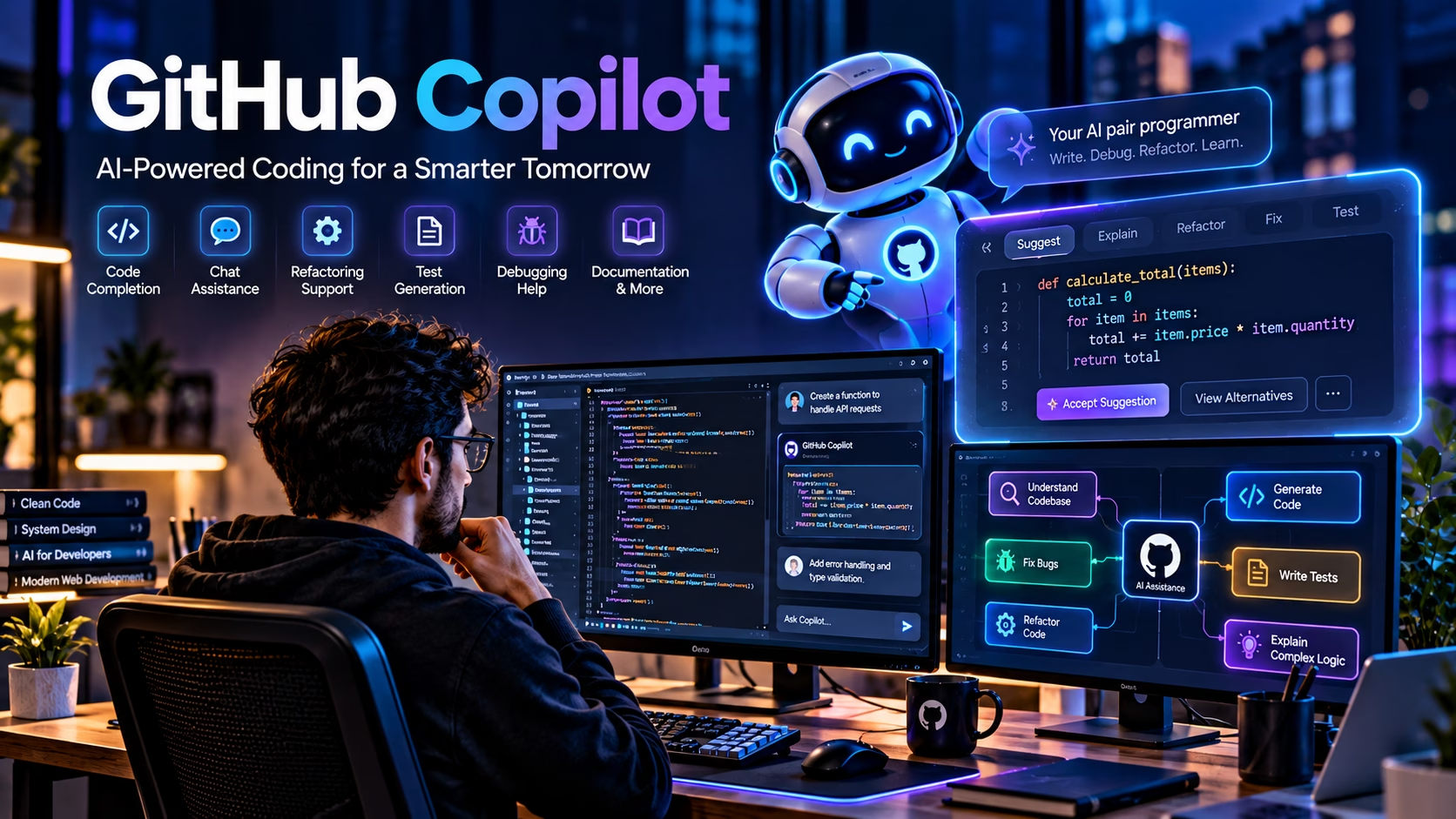
GitHub Copilot is an AI coding assistant built by GitHub, which Microsoft owns. It lives inside your editor, your terminal, the GitHub website, and increasingly inside pull requests. It offers three broadly different kinds of help: inline completions as you type, a conversational chat interface, and agentic workflows where the assistant can plan a change and edit multiple files, subject to your approval and your organisation’s policies. The product has moved a long way from the “fancy autocomplete” reputation it carried in 2021, and the gap between what it can do and what developers trust it to do remains the most interesting thing about it.
This article is written for people who actually ship code. It covers what the tool does, how it does it, where it earns its subscription, where it introduces technical debt or security problems, how it compares with the other major options, and what the sensible working practices look like. It is not a marketing page, and it will not tell you that AI writes better code than you do. It will tell you where the leverage is.
What is GitHub Copilot?
At its core, GitHub Copilot is a set of AI-powered features delivered through editor extensions and GitHub itself. The underlying engine is a family of large language models that have been trained on public source code and natural language, then adapted to the task of predicting what a developer probably wants to write next. You type, it suggests, you accept or reject. You ask a question, it answers in a chat panel. You describe a task, it proposes a patch.
The important distinction is between Copilot and ordinary autocomplete. A conventional autocomplete engine in an IDE ranks symbols already in scope: class members, local variables, imported functions, keywords. It is deterministic, it is fast, and it knows almost nothing about intent. Copilot generates multi-line candidates from a much wider context. It can invent a function body that does not exist yet, propose a test suite for code you just wrote, or explain a block of unfamiliar logic in prose. The trade-off is that a conventional autocomplete is essentially never semantically wrong (it might be unhelpful, but it will not hallucinate a method that does not exist), whereas a generative model can produce something that looks plausible and is completely incorrect.
Where Copilot runs
Copilot is not a single product surface. It appears in several places, and the feature set differs between them. As of early 2026, the officially supported environments include Visual Studio Code, Visual Studio, the JetBrains family of IDEs (IntelliJ IDEA, PyCharm, WebStorm, GoLand, Rider and others), Neovim, Xcode, Eclipse, the GitHub website, GitHub Mobile, and a command line interface. Feature parity across all of these is not guaranteed, and some capabilities, particularly agentic ones, arrive in VS Code first.
Completions, chat, and agents
It helps to think of three layers of assistance with increasing scope and increasing risk.
- Inline completions. Ghost text appears as you type. You press Tab to accept. The blast radius is one hunk of code, and you are looking at it directly. This is the lowest risk and, for many developers, the highest value per second.
- Conversational assistance. You open a chat panel, select a block of code, and ask a question. The assistant can explain, rewrite, generate tests, or propose a fix. The output is prose or a diff that you read before applying. Risk is moderate: you have to actually read the diff.
- Agentic workflows. You describe a task, and the assistant plans steps, edits multiple files, and in some configurations runs commands or opens a pull request. The blast radius is now a branch. Risk is highest, and so is the value when the task is well specified and the repository is well tested.
Most of the disappointment people report with Copilot comes from treating the third layer as if it were the first. An agent that edits nine files based on a vague one-line prompt will produce something, but “something” is not the same as “correct”.
Who benefits, and who does not
Copilot is most valuable to developers who already know what good code looks like. If you can read a proposed function and immediately see that the error handling is wrong, or that the query is vulnerable to injection, or that the timezone conversion will break in March, then the assistant is a genuine accelerator. You are trading typing time for review time, and the trade is favourable.
For beginners, the calculus is more complicated. Copilot can flatten the learning curve for boilerplate and help with unfamiliar syntax, but it can also short-circuit the productive struggle that builds understanding. A junior developer who accepts completions without reading them will build a codebase they cannot debug. That is not a reason to avoid the tool, but it is a reason to use it with the completions off during deliberate practice.
There are also environments where Copilot is not the right fit. Teams working under strict regulatory constraints, air-gapped networks, or unusually sensitive intellectual property need to read the data handling documentation very carefully before enabling any cloud-based assistant. GitHub offers enterprise controls and content exclusions, but the decision is a policy decision, not a technical one, and it should involve whoever owns your compliance posture.
One AI Assistant. Multiple Developer Workflows.
GitHub Copilot can support developers across their editor, terminal and code review process, with capabilities depending on the product, plan and configuration.
Editor Integration
Work with AI-assisted coding in supported environments, including VS Code, Visual Studio, JetBrains IDEs, Neovim, Xcode and Eclipse. Available functionality varies by editor and extension.
GitHub.com and Mobile
Access supported Copilot chat experiences and GitHub workflows on the platform and compatible mobile experiences. Features depend on the interface and account access.
Command Line
Use supported command-line tools to explore repositories, discuss code and assist with terminal-based development without leaving your usual workflow.
Agentic Coding
For supported agent workflows, describe a task and let Copilot help plan changes across files, run permitted operations and propose a solution. Review changes and permissions before relying on the result.
Code Review
AI-assisted pull request reviews can help identify potential defects and areas worth investigating. Treat comments as suggestions, not proof that code is correct or secure.
Enterprise Governance
Business and enterprise offerings may provide administrative policies, content exclusions, audit capabilities and applicable contractual protections. Verify availability against the current plan and official terms.
How GitHub Copilot works behind the scenes
Understanding the pipeline makes the failure modes much easier to predict. When you type in an editor with Copilot enabled, the extension is not sending your entire repository to a model on every keystroke. That would be slow, expensive, and pointless. What it does is assemble a prompt from a set of context sources, send that prompt to a model, and render the returned candidate.
The context that gets assembled
The context window is the model’s working memory for a single request, and everything the model knows about your task has to fit inside it. In practice, the extension and the service build that context from several sources:
- The code immediately before and after your cursor, which for completion requests is often formatted as a fill-in-the-middle task.
- Other open files in the editor, particularly files that are imported or recently edited.
- File paths and repository structure, which give the model hints about conventions and layering.
- For chat and agent requests, the conversation history and any files you have explicitly attached.
- For organisations with repository indexing enabled, semantically retrieved snippets from the wider codebase.
This is why Copilot behaves noticeably better in a repository with clear naming conventions and consistent structure. The model is not reading your code the way you do. It is pattern-matching against a compressed representation of the context it was given, and good context produces better matches.
Why small changes are easier to validate
A completion that adds four lines to a single function has a small surface area. You can read it in three seconds, and if it is wrong, the test suite tells you quickly. An agentic change that touches nine files and modifies a shared interface has a much larger surface area, and the failure modes are subtle: a renamed parameter that breaks a caller in a file the agent did not read, a new dependency that conflicts with an existing pin, a migration that works on an empty database and fails on production data.
This is not a flaw in the model. It is a property of the task. Large, loosely specified changes are hard for humans too. The difference is that a human will notice they are uncertain and ask a question, whereas a model will produce a confident-looking diff regardless.
Why generated code can be plausible but wrong
The model is predicting tokens that are likely to follow the context. It is not executing your code, it is not running your type checker, and it has no direct access to your runtime behaviour. It has learned, from an enormous corpus of code, that certain patterns usually follow certain other patterns. Usually is doing a lot of work in that sentence.
If you want the longer explanation of the underlying mechanism, our article on understanding what machine learning is covers how statistical pattern recognition differs from rule-based logic, and why a system trained on historical examples can generalise well and still be confidently wrong at the edges. The same principle applies here: the model has learned the distribution of plausible code, and plausible is not a synonym for correct.
For a broader grounding in where these systems come from, our complete guide to artificial intelligence puts large language models in context alongside the wider field, including the distinction between systems that generate text and systems that reason over structured state.
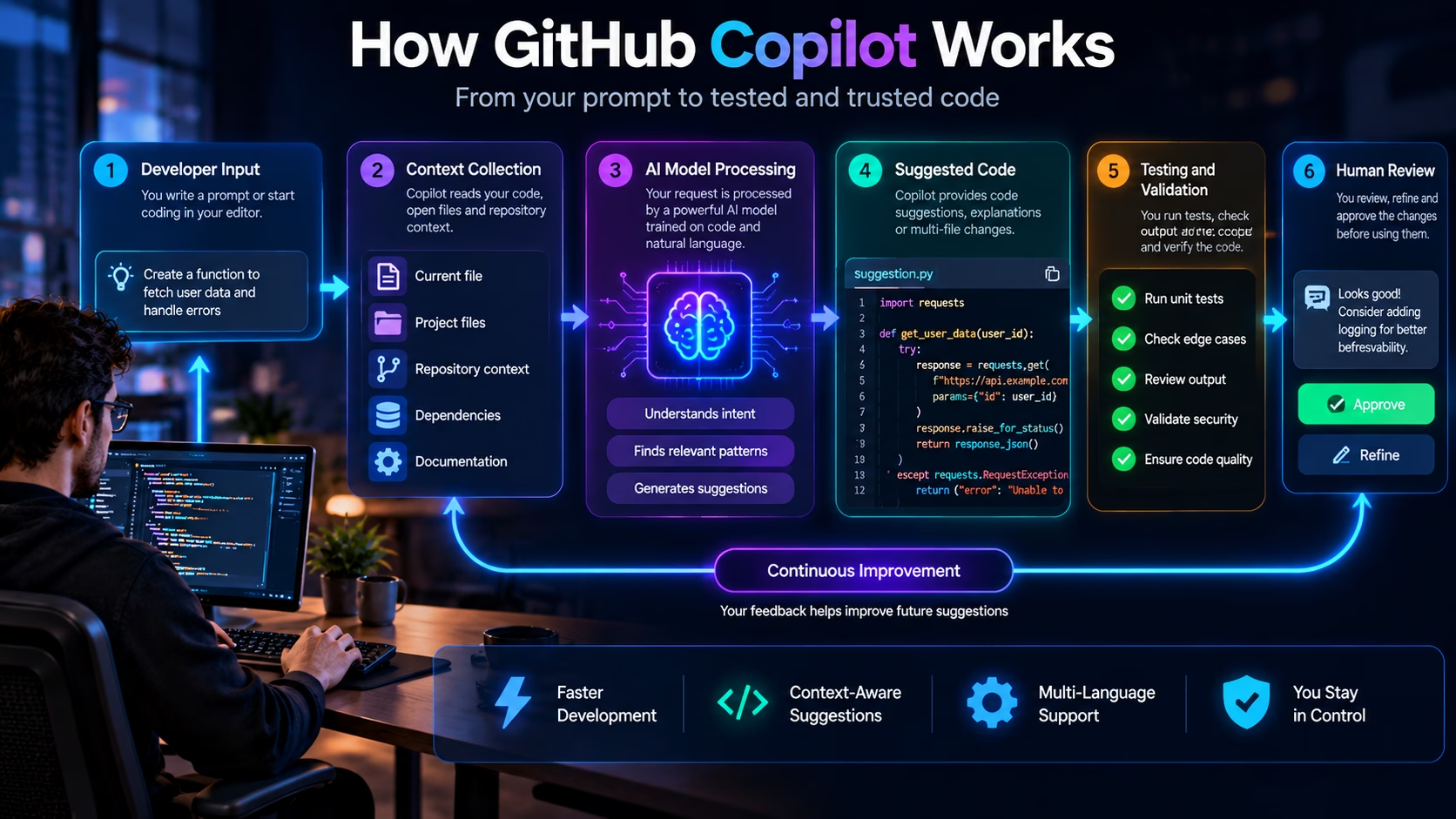
From Your Prompt to Tested Code
See how an AI coding assistant can support each stage, from understanding your request to reviewing and validating the proposed changes.
Developer Input
Describe the task, write a prompt or begin coding. Clear requirements help the assistant understand the intended outcome.
Define the taskContext Collection
Relevant code, open files and available repository context can help shape suggestions. The context available depends on the tool and workflow.
Understand the codeAI Model Processing
The model processes the request and available context to generate code suggestions, explanations or a proposed approach.
Generate suggestionsSuggestion or Action
Depending on the mode, the assistant may suggest a completion, explain code or propose changes across files for the developer to inspect.
Build or modify codeDeveloper Review
Inspect the diff, check assumptions and confirm that the implementation fits the codebase, requirements and security expectations.
Keep human controlTests and Validation
Run relevant tests, check edge cases, inspect errors and use security checks before accepting or deploying the changes.
Verify the resultThe key point
Steps five and six are not optional extras. They are the part of the workflow where engineering judgement is applied, and they are the reason the tool can be trusted at all. Any workflow that skips them is not AI-assisted development, it is unsupervised code generation.
Features developers should understand
The feature list is long and changes frequently. What follows is a practical account of the capabilities that matter in day-to-day work, with an honest note on what can go wrong and how to check the output. Availability varies by plan, IDE, and organisation policy, so treat this as a map rather than a contract.
Inline code completion
This is the feature most people think of first, and it remains the one with the best ratio of value to risk. You type a function signature and a docstring, and Copilot proposes a body. You write a loop and it proposes the accumulation logic. You start a test and it proposes the assertions.
What it addresses: the friction of translating a clear mental model into syntax, especially in a language or framework you use less often. What can go wrong: off-by-one errors, missing null checks, assumptions about input shape that are not guaranteed, and copy-paste of a pattern from a different context. Validation is straightforward because the change is small: read it, run the tests, check the edge cases you know about.
Copilot Chat
The chat panel is where most of the genuine learning happens. You can ask why a function exists, what a regex does, why a test is flaky, or how a library’s API is meant to be used. You can use slash commands for common tasks such as explaining the current selection or generating tests. You can attach files for context.
What it addresses: the cost of orienting yourself in unfamiliar code. What can go wrong: the model may describe what the code appears to do rather than what it actually does, particularly when the behaviour depends on runtime configuration, database state, or a framework convention that is not visible in the file. Validation means checking the claim against the code and, where possible, against a test.
Refactoring and code explanation
Refactoring assistance is useful for mechanical transformations: extracting a helper, renaming a concept consistently, converting a callback chain to async/await, replacing a deprecated API. It is much weaker at architectural refactoring, where the correct change depends on a design decision the model cannot make for you.
What can go wrong: the model changes behaviour subtly while claiming to preserve it. A refactor that alters evaluation order, swallows an exception that used to propagate, or changes the type of a returned value is not a refactor. Validation means running the full test suite and reading the diff line by line, not just the summary.
Test generation
Generating tests is one of the strongest use cases, provided you review what comes back. The model is good at producing the obvious cases and the boilerplate around them: happy path, empty input, a missing field. It is much less reliable at the cases that actually matter: concurrency, timezone boundaries, numeric precision, partial failure, and the specific business rule that a domain expert would flag.
What can go wrong: tests that assert the current behaviour rather than the intended behaviour, which is a subtle way of locking a bug into the suite. Validation means asking whether each assertion would fail if the implementation were wrong.
Debugging support
Copilot can help interpret a stack trace, suggest a hypothesis for a failing test, or propose additional logging. It is useful as a second opinion. It is not a debugger. It cannot see your production state, and it will sometimes propose a fix for a symptom rather than a cause.
Agentic coding
Agent mode and the coding agent represent the most significant shift in the product. You describe a task, and the assistant plans and executes it across multiple files, typically producing a branch or a pull request for review. This is genuinely useful for well-scoped chores: adding a new endpoint that follows an existing pattern, updating a dependency across a set of call sites, writing a migration and its tests.
What can go wrong: scope creep, missed call sites, inconsistent style, and a diff that is large enough that reviewers skim it. Validation means reading the full diff, running the pipeline, and being willing to reject the change and start again rather than patching it into shape.
Pull request review and repository context
Automated review comments can catch the obvious things: a missing null check, an unhandled promise, a test that does not assert anything. They are a useful first pass and a poor final pass. Repository indexing, where available, improves the model’s awareness of internal libraries and conventions, which is one of the biggest practical differences between a well-configured enterprise deployment and a bare personal subscription.
Model selection and IDE coverage
Copilot lets you choose between several underlying models on paid tiers, and the choice matters. Some models are faster and better at tight completion loops; others are stronger at multi-step reasoning and long-context explanation. The available list changes often, so check the current documentation rather than relying on a blog post, including this one. Model availability also differs by plan and by organisation policy.
| Feature | Problem it solves | Typical failure | How to validate |
|---|---|---|---|
| Inline completion | Syntax friction, boilerplate | Missing edge case, wrong assumption | Read the hunk, run unit tests |
| Chat explanation | Orientation in unfamiliar code | Confident but inaccurate description | Cross-check against tests and runtime behaviour |
| Test generation | Scaffolding and obvious cases | Tests that lock in current behaviour | Mutate the code and confirm tests fail |
| Refactoring | Mechanical transformation | Silent behaviour change | Full suite plus line-by-line diff review |
| Agentic coding | Multi-file scoped chores | Missed call sites, style drift | Full diff review, CI, integration tests |
| Code review | First-pass defect detection | Superficial or generic comments | Human review remains mandatory |
Practical GitHub Copilot coding examples
The examples below are illustrative. They show the kind of prompt you might give, the kind of code that comes back, and the review you should apply. They are not transcripts of real Copilot output, and you should not assume your results will match them exactly. The point is the workflow, not the specific snippet.
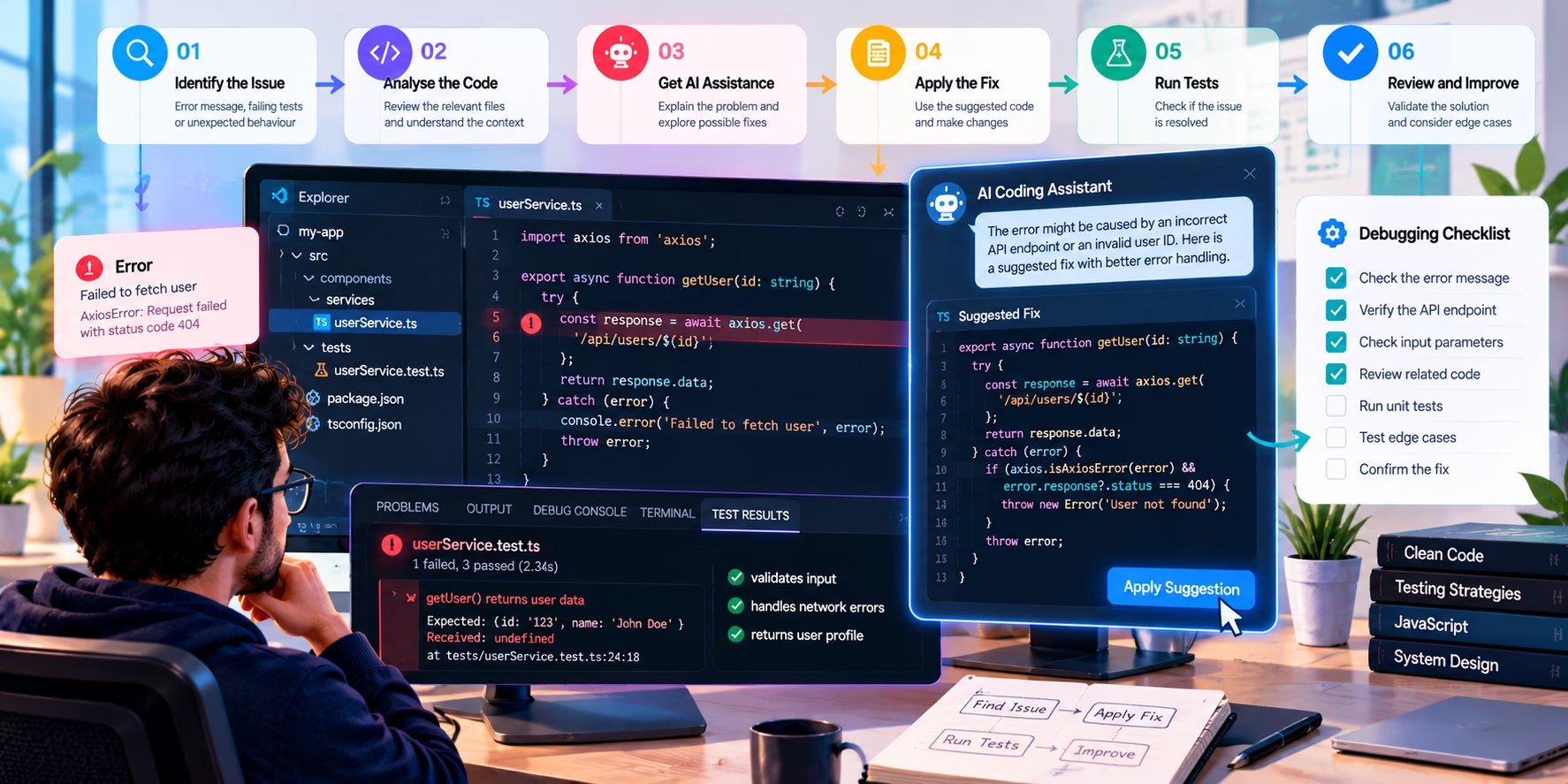
Example 1: generating a small utility function
The problem. You need to parse duration strings from a configuration file. The values look like 250ms, 1.5s, 2h, and occasionally 3d. You want seconds as a float, and you want clear errors for anything unrecognised.
The prompt. “Write a Python function parse_duration(text: str) -> float that converts strings like ‘250ms’, ‘1.5s’, ‘2h’, ‘3d’ into seconds. Use a compiled regex. Raise ValueError with the offending input on a bad match, and TypeError if the input is not a string. Do not use eval.”
import re

_DURATION_RE = re.compile(
    r"^\s*(?P<value>\d+(?:\.\d+)?)\s*(?P<unit>ms|s|m|h|d)\s*$",
    re.IGNORECASE,
)

_MULTIPLIERS = {
    "ms": 0.001,
    "s": 1.0,
    "m": 60.0,
    "h": 3600.0,
    "d": 86400.0,
}


def parse_duration(text: str) -> float:
    """Parse a duration string such as '250ms' or '1.5h' into seconds."""
    if not isinstance(text, str):
        raise TypeError("duration must be a string")
    match = _DURATION_RE.match(text)
    if match is None:
        raise ValueError(f"Unrecognised duration: {text!r}")
    value = float(match.group("value"))
    unit = match.group("unit").lower()
    return value * _MULTIPLIERS[unit]
What to check. The regex is anchored and compiled once, which is good. Negative values are rejected because the pattern has no sign, which may or may not be what you want. Compound durations such as 1h30m are not supported, and the error message will be unhelpful if a user tries. Floating point multiplication introduces the usual binary representation issues, so if you need exact values, work in integer milliseconds instead.
Validation. A parametrised test covering valid strings, whitespace variants, uppercase units, empty strings, None, and a compound duration you explicitly do not support.
Example 2: writing unit tests for existing code
The problem. You have a function that calculates an order total, and it has no tests. You want a suite that would catch a regression if someone changed the rounding.
// pricing.js (existing code, not generated)
export function calculateOrderTotal(items, taxRate) {
  if (!Array.isArray(items)) {
    throw new TypeError("items must be an array");
  }
  const subtotal = items.reduce((sum, item) => {
    if (!Number.isInteger(item.unitPriceCents) || item.unitPriceCents < 0) {
      throw new RangeError("unitPriceCents must be a non-negative integer");
    }
    if (!Number.isInteger(item.quantity) || item.quantity < 1) {
      throw new RangeError("quantity must be a positive integer");
    }
    return sum + item.unitPriceCents * item.quantity;
  }, 0);
  const tax = Math.round(subtotal * taxRate);
  return { subtotal, tax, total: subtotal + tax };
}
The prompt. “Write Jest tests for calculateOrderTotal. Cover the happy path, an empty array, a zero quantity, a negative price, a non-integer price, and a tax rate that produces a rounding boundary. Assert on the returned object, not on internal variables. Do not mock anything.”
import { calculateOrderTotal } from "./pricing.js";

describe("calculateOrderTotal", () => {
  test("sums line items and applies tax", () => {
    const items = [
      { unitPriceCents: 1250, quantity: 2 },
      { unitPriceCents: 399, quantity: 1 },
    ];
    expect(calculateOrderTotal(items, 0.2)).toEqual({
      subtotal: 2899,
      tax: 580,
      total: 3479,
    });
  });

  test("returns zero totals for an empty order", () => {
    expect(calculateOrderTotal([], 0.2)).toEqual({
      subtotal: 0, tax: 0, total: 0,
    });
  });

  test("rejects a zero quantity", () => {
    expect(() =>
      calculateOrderTotal([{ unitPriceCents: 100, quantity: 0 }], 0.2)
    ).toThrow(RangeError);
  });

  test("rejects a non-integer price", () => {
    expect(() =>
      calculateOrderTotal([{ unitPriceCents: 99.5, quantity: 1 }], 0.2)
    ).toThrow(RangeError);
  });

  test("rounds tax at the half-cent boundary", () => {
    // 333 cents at 15% is 49.95, which must round to 50
    expect(calculateOrderTotal([{ unitPriceCents: 333, quantity: 1 }], 0.15).tax)
      .toBe(50);
  });
});
What to check. Generated tests have a habit of asserting whatever the code currently does. That is fine for a regression suite but useless for finding bugs. A useful discipline is mutation testing in miniature: change the implementation deliberately and confirm the test fails. If you flip Math.round to Math.floor and the suite still passes, the suite is not testing the rounding.
Example 3: refactoring repetitive code
The problem. You have four near-identical blocks that read a key from a dictionary, coerce it, and fall back to a default. The duplication is making a forthcoming change painful.
# Before: four near-identical lookups
timeout = int(config.get("timeout", "30"))
retries = int(config.get("retries", "3"))
workers = int(config.get("workers", "4"))
batch_size = int(config.get("batch_size", "100"))

# After: one helper, same public behaviour
def _int_setting(config: Mapping[str, str], key: str, default: int) -> int:
    raw = config.get(key)
    if raw is None or raw == "":
        return default
    try:
        return int(raw)
    except ValueError as exc:
        raise ValueError(f"{key} must be an integer, got {raw!r}") from exc

timeout = _int_setting(config, "timeout", 30)
retries = _int_setting(config, "retries", 3)
workers = _int_setting(config, "workers", 4)
batch_size = _int_setting(config, "batch_size", 100)
What to check. The refactor changes behaviour in one respect: an empty string used to raise ValueError from int(""), and now returns the default. That might be an improvement or a regression, depending on the contract. This is exactly the kind of subtle change a generated refactor can introduce while claiming to be behaviour-preserving. Read the diff, not the summary.
Example 4: investigating a bug and improving error handling
The problem. A user lookup endpoint occasionally returns a 500 instead of a 404. The logs show a database timeout under load. You want a fix that distinguishes “not found” from “database unavailable” and does not introduce an injection risk.
import type { Pool } from "pg";

export class DatabaseUnavailable extends Error {}

export async function findUserByEmail(pool: Pool, email: string) {
  try {
    // Parameterised query: never interpolate user input into SQL.
    const { rows } = await pool.query(
      "SELECT id, email, created_at FROM users WHERE email = $1 LIMIT 1",
      [email],
    );
    return rows[0] ?? null;
  } catch (error) {
    const code = (error as { code?: string }).code;
    if (code === "ECONNREFUSED" || code === "ETIMEDOUT") {
      throw new DatabaseUnavailable("user lookup failed");
    }
    throw error;
  }
}
What to check. The query is parameterised, which is the important part and the thing you should verify in every generated database snippet without exception. The error classification is deliberately narrow: it maps two specific network codes to an availability error and rethrows everything else, which is the right default. It does not log the email address, which avoids leaking personal data into logs. It also does not retry, which is a decision you should make explicitly rather than inherit from a suggestion.
Validation. A test that stubs the pool to throw an error with code: "ETIMEDOUT" and asserts that DatabaseUnavailable is raised, plus a test that stubs a generic error and asserts it propagates unchanged. Add an integration test against a real database to confirm the parameterised query behaves as expected on your schema.
Better prompts for GitHub Copilot
Prompt quality is the single biggest lever you control. A vague prompt produces generic code that you then have to rewrite. A specific prompt produces something closer to what you meant, and, just as importantly, gives you a clearer basis for judging whether the output is right.
A useful coding prompt usually contains five things: the context (what the code is and where it sits), the requirement (what must change), the constraints (what must not change, what style to follow), the expected behaviour (inputs and outputs, including edge cases), and the acceptance criteria (how you will know it worked). You do not need all five every time, but when a task goes wrong, one of them is usually the missing piece.
The cards below are copyable. Select the text manually if the copy button is unavailable in your browser or assistive setup.
1. Explaining unfamiliar code
Use when you have inherited a module and need a fast, checkable orientation.
Explain the function I have selected. Structure the answer as:
1. What it returns and under what conditions.
2. Its inputs and any assumptions about their shape.
3. Side effects, including I/O, mutation, and exceptions.
4. Anything that looks like a latent bug or an undocumented constraint.
Quote the specific lines you are basing each claim on.
2. Creating unit tests
Use when you need coverage quickly but still intend to review the assertions.
Write unit tests for the selected function using the existing test framework in this repository.
Cover: the happy path, empty input, one boundary value, one invalid input, and one case where the function should fail closed.
For each test, add a one-line comment explaining the behaviour it protects.
Do not mock anything unless the function performs I/O.
3. Fixing a reproducible bug
Use when you have a stack trace and a failing test, not just a symptom.
Here is a failing test and the error output. Identify the smallest change that makes the test pass without altering the public interface.
State your hypothesis about the root cause before proposing a patch.
If more than one fix is possible, list them and explain the trade-offs.
Do not weaken the assertion or skip the test.
4. Refactoring without changing behaviour
Use when the goal is structural improvement, not new functionality.
Refactor the selected function to remove duplication. Constraints:
- The public signature must not change.
- Behaviour must be identical for all inputs, including error paths.
- No new dependencies.
Show the diff and list every behaviour difference you can identify, even if you believe it is benign.
5. Reviewing for security and edge cases
Use before opening a pull request, not after someone else finds the problem.
Review the selected code for security and correctness. Check specifically:
- Input validation and trust boundaries.
- Injection risks in any query or command construction.
- Authentication and authorisation assumptions.
- Error handling that could leak internal detail.
- Concurrency and resource cleanup.
Return a numbered list. For each item, state the risk, the line, and a concrete fix.
6. Implementing a small feature with acceptance criteria
Use when you want a scoped change rather than an open-ended one.
Implement a new endpoint that follows the existing pattern in this module.
Acceptance criteria:
- Returns 200 with the resource when the caller is authorised.
- Returns 404 when the resource does not exist.
- Returns 403 when the caller lacks permission.
- Never returns 500 for a client error.
Follow the existing validation helpers and error types. Do not add dependencies.
List the files you changed and why.
A necessary caveat
No prompt guarantees correct output. A better prompt improves the odds and makes the output easier to evaluate, but it does not transfer responsibility. The review step is still yours.
GitHub Copilot for different developer workflows
The value of AI assistance is not uniform across roles. It depends on your experience, the complexity of the task, the quality of the codebase, and how much verification you are able and willing to do. Here is how it plays out for different kinds of developer.
Beginners learning to code
Copilot can be a patient tutor for syntax and a fast way to see idiomatic patterns. It can also rob you of the struggle that makes concepts stick. A reasonable compromise is to keep completions enabled for boilerplate but disable them during deliberate practice, and to make a habit of explaining every accepted suggestion out loud before moving on. If you cannot explain it, you should not keep it.
Experienced software engineers
This is where the tool earns its keep most reliably. A senior developer already knows what correct looks like, so the review cost is low and the typing saved is real. The strongest use cases are mechanical work: scaffolding tests, translating a pattern to a new framework, writing the boring parts of a well-understood change.
Front-end developers
Copilot is useful for component scaffolding, prop type definitions, accessibility boilerplate, and CSS resets. It is weaker at design judgement and can produce layouts that look plausible but break at unusual viewport sizes or with right-to-left text. Treat generated markup as a starting point and test with a screen reader, not just a browser.
Back-end developers
Strong for repository patterns, serialisation code, and validation layers. Weaker for anything involving transactions, concurrency, or query performance, where the model has no visibility into your data distribution or locking strategy. Review generated SQL carefully and insist on parameterisation.
Full-stack developers
The biggest benefit is context switching. Moving between a React component and a Django view and a Terraform module involves a lot of small syntax recall. Copilot reduces that friction noticeably. The risk is that you accept a pattern from one layer and apply it in another where it does not belong.
Test engineers
Genuinely useful for expanding coverage and generating data fixtures. Use it to write the tests, then review the assertions yourself. A generated test that asserts current behaviour is worse than no test at all, because it creates false confidence.
DevOps and platform engineers
Helpful for pipeline YAML, Helm values, and shell scripts. Dangerous for anything with a blast radius: a generated rm -rf, a permissive IAM policy, or a security group opened to the world. Read infrastructure code twice, and run it in a sandbox first.
Open-source contributors
Useful for orienting yourself in an unfamiliar repository and matching its conventions. Be aware that many projects have contribution policies about AI-generated code, and that some maintainers require disclosure. Read the contributing guide before you open a pull request.
Teams maintaining legacy applications
This is one of the highest-value scenarios. Legacy code is often poorly documented, thinly tested, and intimidating to change. Copilot can summarise modules and propose characterisation tests. It will also confidently misdescribe old code whose behaviour depends on a framework version or a database quirk, so verify against runtime behaviour.
Technical founders building prototypes
The speed advantage is real when you are trying to validate an idea. The debt accumulates just as fast. A prototype written largely by an assistant can be very hard to hand to a first engineering hire, because nobody on the team has a mental model of why the code looks the way it does. Keep prototypes deliberately disposable, and rewrite the parts that survive.
GitHub Copilot vs the Best AI Tools for Developers in 2026
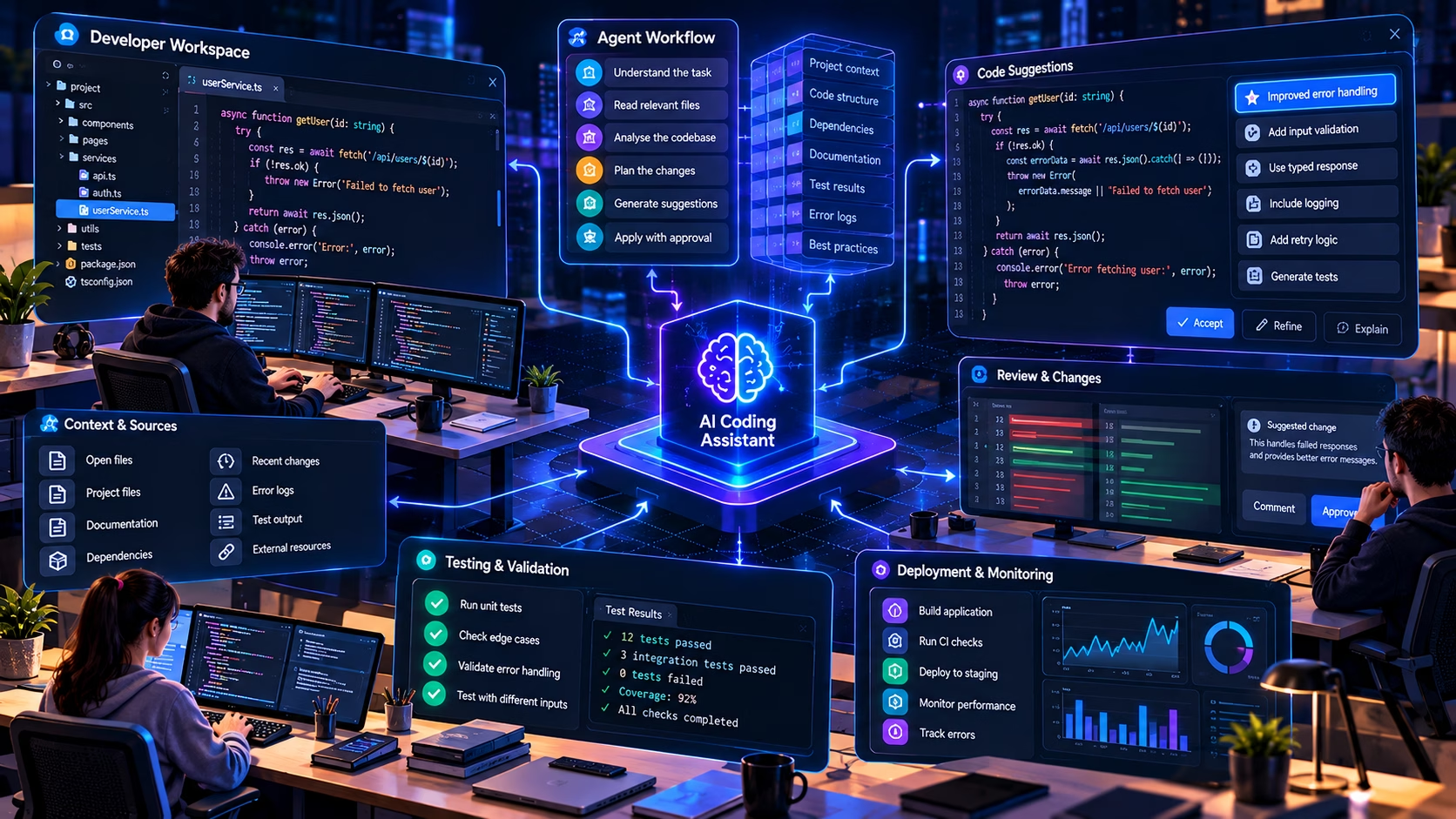
The market for the Best AI Tools for Developers in 2026 is crowded, and it is genuinely different from the market two years ago. The interesting question is no longer “which tool writes the best snippet” but “which tool fits the way your team actually works”. The answer depends on your IDE, your budget, your privacy requirements, and how much autonomy you are willing to give an agent.
Here is a comparison of the main options. Feature sets change quickly, and several of these products ship changes weekly, so verify anything important against current documentation before making a purchasing decision.
| Tool | Main workflow | Key strengths | Important limitations | Ideal user | Pricing notes | Privacy and deployment |
|---|---|---|---|---|---|---|
| GitHub Copilot | IDE extension, chat, agent mode, pull request review | Broadest IDE coverage, deep GitHub integration, enterprise governance | Agent capability varies by IDE; quality depends on plan tier and model choice | Teams already on GitHub who want one integrated assistant | Free tier plus paid individual and business plans; verify current figures | Content exclusions, policy controls, audit logs on business tiers |
| Cursor | Standalone AI-first editor (VS Code fork) | Strong multi-file editing, good codebase indexing, fast iteration | Requires switching editor; not a drop-in for teams on JetBrains or Visual Studio | Developers willing to change their editor for a tighter AI loop | Free tier and paid subscription tiers; check current pricing | Configurable privacy mode; review data retention terms |
| Windsurf | Agentic editor with a flow-oriented interface | Emphasis on multi-step agent runs and automatic context gathering | Smaller ecosystem; editor lock-in; agent behaviour can be hard to predict | Developers who want agent-first workflows rather than incremental completion | Free tier and paid plans; verify | Enterprise options available; check terms per tier |
| Claude Code | Terminal-first agentic coding | Strong long-context reasoning, good at large refactors and repository-wide tasks | Command-line interface; less integrated into editor UI; requires comfort with terminals | Engineers comfortable in a shell who want agentic changes with review | Usage-based and subscription options; verify current model access | Depends on deployment mode; review data handling carefully |
| OpenAI Codex | Cloud and CLI agentic workflows, IDE integration | Strong reasoning models, parallel task execution in some configurations | Product surface and availability have changed repeatedly; verify before adopting | Teams experimenting with delegated agent tasks | Plan-dependent; verify current availability in your region | Review organisational data controls before use on proprietary code |
| Gemini Code Assist | IDE extension with Google Cloud integration | Good fit for teams already on Google Cloud; generous free tier historically | Feature depth varies by IDE; less mature agentic tooling than some rivals | Google Cloud shops wanting an integrated assistant | Free and paid tiers; verify current limits | Cloud data handling governed by Google Cloud terms |
| Continue and other open-source assistants | Self-hosted or bring-your-own-model extensions | Maximum control, model flexibility, no vendor lock-in | You operate it; setup and maintenance cost is real; quality depends on your model | Teams with strict data residency or air-gap requirements | Free software; you pay for model inference or hardware | Strongest option for full data control if you self-host |
There is no universal winner here, and any article that declares one is selling something. A JetBrains-based Java team with strict compliance requirements has a different answer from a solo founder prototyping a Next.js app. The right approach is to pick the tool that fits your existing editor, your security posture, and the kind of work you actually do, then measure whether it helps.
Related reading on HanjuthAI
Best AI Tools for Developers in 2026
A wider comparison of coding assistants, agent platforms, and developer tooling, with guidance on choosing according to IDE, workflow, budget, and privacy requirements.
One point worth making about model quality specifically. A great deal of the public discussion conflates the capability of a language model with the capability of a coding product. They are not the same thing. A model can be excellent at reasoning over a long context and still be a mediocre coding assistant if the product around it does not collect the right context, respect your file structure, or surface changes in a reviewable way. If you want to understand the model side of that distinction, our piece on GPT-6 Astra and its AI capabilities looks at what frontier models can do with reasoning and context. It does not mean that model is available inside GitHub Copilot, and you should not assume any specific model is available in any specific tool without checking the documentation.
Pricing, plans, and value for money
GitHub sells Copilot across a free tier and several paid tiers aimed at individuals, businesses, and enterprises. The headline structure has been stable, but the specific usage allowances, premium request quotas, and model access have changed several times, and they will change again.
Verify before you buy
The figures below reflect the published structure at the time of writing in early 2026 and are quoted in US dollars. Prices, quotas, and included features are subject to change and vary by region and billing arrangement. Always confirm against the official GitHub Copilot plans page before making a purchasing decision. This article deliberately does not present these numbers as permanent.
| Plan | Intended for | Notable inclusions | Things to check |
|---|---|---|---|
| Copilot Free | Individuals evaluating the tool | Limited monthly completions and chat requests, access to a subset of models | Usage caps; not suitable for heavy daily use |
| Copilot Pro | Individual developers | Higher usage limits, model selection, premium request allowance | Premium request overage behaviour; which models are included |
| Copilot Pro+ | Power users and heavy agent users | Higher premium request allowance, access to more capable models | Whether your workload actually needs the higher tier |
| Copilot Business | Teams and organisations | Centralised management, policy controls, content exclusions, audit logging, IP indemnity | Per-seat cost; how policy inheritance works across orgs |
| Copilot Enterprise | Large organisations | Repository and knowledge base indexing, deeper GitHub integration, enterprise controls | Indexing scope; onboarding effort for internal documentation |
The value question is more interesting than the price question. A subscription is not automatically worth it. It is worth it if you use it regularly, if you can validate what it produces, and if the time it saves exceeds the time you spend reviewing and correcting. For a developer who writes mostly well-understood CRUD code, the savings are real. For a developer whose work is dominated by novel algorithm design or complex distributed systems, the savings are smaller and the review overhead is higher.
A pragmatic way to evaluate it is to run a two-week trial and track one thing: how often you accept a suggestion and then have to modify it within the same working session. If that number is high, you are paying for rework. If it is low, you are paying for leverage.
Productivity, code quality, and real-world limitations
Faster code generation is not the same as better software engineering. It is worth being precise about this, because a lot of the discourse blurs the two.
Where the time actually comes back
Repetitive coding is the clearest win. Boilerplate, serialisers, DTO mappers, configuration plumbing, and test scaffolding are all work that has to be done and contains little intellectual challenge. Handing that to an assistant is a straightforward trade.
Learning unfamiliar APIs is the second clear win. When you know what you want to do but not the exact method signature, a completion is often faster than a documentation search. The caveat is that the model may produce an API that existed in an older version, or one that looks plausible but does not exist at all.
Test writing is a genuine accelerator, provided you review the assertions. Refactoring is useful for mechanical transformations. Debugging is useful as a second opinion. Everything else is more situational than the marketing suggests.
Where the cost appears
- Review overhead. A large generated diff takes real time to read. If you skip the reading, you are not reviewing, you are hoping.
- Hallucinated functions and incorrect APIs. The model will confidently call a method that does not exist, or use a library function with the wrong argument order. Tests catch this; careful reading catches it faster.
- Hidden edge cases. Generated code tends to handle the happy path well and the unhappy path poorly. Null inputs, empty collections, unicode, timezone boundaries, and concurrent access are recurring weak spots.
- Overly complicated implementations. Models sometimes produce a general solution to a specific problem. If a fifteen-line function would do, a sixty-line abstraction with three callbacks is not an improvement.
- Technical debt. Accepted suggestions accumulate. A codebase with no consistent voice is harder to maintain than one written by a person with opinions.
- Inconsistent style. The model follows the local context, so if your codebase is inconsistent, it will be inconsistently inconsistent.
- False confidence. This is the dangerous one. Code that compiles, passes a shallow test, and looks familiar feels trustworthy. That feeling is not evidence.
There are studies on developer productivity with AI assistants, and they are worth reading carefully rather than quoting selectively. Many of the early studies measured narrow, well-defined tasks with participants who were familiar with the tool, which tends to overstate the benefit relative to messy real-world work. Others measured self-reported productivity, which is informative but not the same as measured throughput. Where a study exists, read the methodology before you cite the number. This article deliberately does not quote a productivity percentage, because the honest summary is that the effect depends heavily on the task and the developer.
Where AI Coding Assistance Fits into a Developer’s Workflow
AI coding assistants can help across several stages of software development. These editorial ratings illustrate their relative fit across common tasks, rather than measuring the performance of one specific product.
Code completion
5.0/5Code explanation
4.5/5Test generation
4.0/5Documentation drafting
4.0/5Refactoring assistance
3.5/5Debugging support
3.0/5How to read this chart. These are subjective editorial assessments on a five-point scale. They do not represent measured time savings, benchmark results, success rates or a verified ranking of individual AI coding tools. Actual usefulness depends on the task, codebase, model and developer.
HanjuthAI editorial visual · Qualitative assessment · Scale: 1 to 5
Security, privacy, and responsible AI coding
Security is where the gap between “works” and “safe” is widest. A generated function can be functionally correct and still introduce a vulnerability, and the vulnerability will not show up in a test that only checks the happy path.
Data handling and confidentiality
The first question is what leaves your machine. Depending on your plan and configuration, code snippets, open files, and chat prompts are sent to a hosted service for inference. GitHub publishes documentation on how data is handled, retained, and used for model training, and the details differ between individual and business tiers. Read that documentation rather than relying on a summary, and involve whoever owns your compliance posture before enabling the tool on proprietary code.
Content exclusions let administrators prevent specified files or repositories from being used to inform suggestions. They are a useful control but not a substitute for a data classification policy. If a file must never leave your network, the safest control is to keep it out of the tool’s reach entirely.
Licensing and provenance
Copilot can produce code that closely resembles public source. GitHub provides filters and, on paid business tiers, an IP indemnity commitment, but this is a commercial and legal topic, not a technical guarantee. Organisations with strict open-source licence policies should consult their legal team and should not treat any AI tool as a substitute for licence scanning.
The recurring vulnerability classes
- Injection. Generated SQL, shell commands, and template strings are a recurring source of injection risk. Always insist on parameterised queries and argument arrays, and reject any suggestion that interpolates user input into a query or command.
- Broken authentication and authorisation. Models will happily generate a route handler that forgets the permission check. Every generated endpoint needs an explicit authorisation review.
- Inadequate input validation. Generated validators often check type but not range, encoding, or length. Validate at the trust boundary.
- Secrets in prompts and code. Never paste credentials, tokens, or customer data into a chat panel. Never accept a suggestion that hardcodes a key. Use environment variables and a secret manager.
- Insecure dependencies. A model may suggest a package that is unmaintained, typosquatted, or vulnerable. Check the package name character by character and run your dependency scanner.
- Supply chain. Generated build scripts and CI configuration deserve the same scrutiny as application code, sometimes more, because they run with elevated privileges.
GitHub Copilot and the future of software engineering
The direction of travel is fairly clear, even if the specifics are not. Assistants are moving from generating lines to generating changes, and from generating changes to taking on scoped tasks with a review at the end. That shift changes the shape of a developer’s day more than it changes the fundamentals of the job.
What is already available, in some form, includes multi-file agentic editing, automated pull request review, repository-aware context through indexing, and task delegation where an agent works on a branch and returns a pull request. What is plausible but not confirmed includes more autonomous long-running tasks, tighter integration with issue trackers, and agents that can run and interpret test suites without supervision. Treat the second list as speculation, because it is.
The skills that matter do not disappear. If anything they become more valuable. Architecture is still a human decision, because it depends on trade-offs the model cannot weigh: what the business can afford to operate, what the team can maintain, what the regulatory environment allows. Debugging is still human, because it depends on forming a hypothesis about a system whose state the model cannot see. Data structures and algorithms still matter, because choosing the wrong one is a decision that no amount of code generation can rescue. Security, testing, performance, code review, product requirements, and operational reliability all remain exactly as important as they were, and slightly harder to get right when more code is arriving faster.
The realistic near-term picture is a workflow where the assistant handles the mechanical middle of a task and the developer handles the framing at the start and the verification at the end. That is a good deal for developers who are strong at framing and verification, and a bad deal for anyone who was relying on typing speed as their main contribution.
AI coding in safety-critical and complex engineering
There is a large difference between using AI to help write a web application and using it to help write software that controls a physical system. That difference is not about the quality of the model. It is about the consequences of being wrong.
Consider the kind of engineering involved in how artificial intelligence is shaping space exploration. Flight software, guidance systems, telemetry pipelines, and simulation environments operate under constraints that ordinary application development does not: deterministic timing, verified behaviour under fault conditions, exhaustive test coverage of failure modes, and independent review by engineers who are accountable for the outcome.
In those environments, an AI assistant can be useful for the parts of the work that are ordinary software engineering: writing test harnesses, generating simulation scaffolding, drafting documentation, and refactoring analysis scripts. It cannot be trusted to produce flight-critical control logic without exactly the same verification that any other code would receive, and arguably more, because the code may look more conventional than it is.
The safeguards in safety-critical engineering are not bureaucratic overhead. They are the mechanism by which confidence is established. Simulation with representative physics, formal or systematic test coverage, independent verification and validation, deterministic control logic that behaves predictably under all inputs, monitoring and telemetry in operation, rollback strategies for deployed changes, and human engineering oversight with clear accountability. None of these are replaced by a coding assistant, and any workflow that treats them as optional is not an AI workflow, it is an unsafe one.
The same reasoning applies, at lower stakes, to financial systems, medical devices, industrial control, and any code path where an error has real-world consequences beyond a broken page. The more serious the consequence, the more the verification burden sits with humans, regardless of how the code was produced.
Primary sources and further reading
The claims in this article about product behaviour, feature availability, and data handling are based on GitHub’s official documentation. Readers should verify current details directly, because the product changes frequently.
- GitHub Copilot documentation Official reference for features, IDE support, and configuration.
- GitHub Copilot plans and pricing Current plan comparison. Prices and quotas change, so check before purchase.
- GitHub Changelog Release notes and announcements for new Copilot capabilities.
- Managing Copilot in your organisation Policy controls, content exclusions, and administrative features.
- Custom instructions and configuration How repository and organisation conventions can be communicated to the assistant.
Independent evaluations and comparisons are useful context, but they age quickly. Where a third-party study is cited elsewhere, check its methodology and publication date before relying on the conclusion.
The Developer’s Edge in an AI-Assisted Coding World
Here is the practical version of everything above, condensed into a working method.
Define the task before you prompt. Write one sentence describing the change and one sentence describing how you will know it worked. If you cannot write the second sentence, you are not ready to delegate. This takes ninety seconds and saves far more than ninety seconds.
Provide relevant context. Attach the files that matter. Mention the framework version. Say which conventions to follow and which to avoid. The model is not going to infer your team’s house style from a single function, and it should not have to.
Constrain the change. Specify what must not change: the public interface, the dependencies, the error types, the database schema. Unconstrained prompts produce unconstrained diffs, and unconstrained diffs are where review debt accumulates.
Inspect the diff. Not the summary. Not the chat response. The diff. Every line. This is non-negotiable, and it is the step most often skipped when a developer is under time pressure, which is precisely when skipping it is most expensive.
Run the tests. All of them, not just the ones the assistant generated. Then ask whether the tests would have caught the change if it had been wrong. If the answer is no, the tests are decoration.
Check security explicitly. Parameterisation, authorisation, validation, secrets, dependencies. Use the checklist above. It takes two minutes and catches the majority of serious generated-code vulnerabilities.
Measure the outcome. Not the speed of generation, the outcome. Did the change ship without a follow-up fix? Did it introduce a bug that took an hour to find? Over a month, that ratio tells you whether the tool is working for you or whether you are working for it.
GitHub Copilot is a genuinely useful tool in 2026, and it is also a tool that rewards discipline and punishes carelessness in roughly equal measure. The developers who get the most from it are not the ones who accept the most suggestions. They are the ones who know exactly which parts of their workflow to hand over and which parts to keep, and who have built the habits, the tests, and the review culture that make handing over safe in the first place.
The future of software engineering is not a choice between human judgement and machine speed. It is a workflow where the machine removes the friction and the human supplies the judgement, and where the quality of the result depends almost entirely on how seriously the human takes the second half of that sentence. Learn the tools. Keep the judgement. That combination is the developer’s edge, and it is not going away.
HanjuthAI publishes technical analysis on artificial intelligence, developer tooling, and software engineering practice.
This article is editorial analysis, not legal, security, or procurement advice. Verify current pricing, feature availability, and data handling terms with GitHub before making decisions.